
Previously called Froggy RAG and Froggy Insight Hub, Froggy Context Hub reflects the product's broader role as a local context layer for RAG, passthrough APIs, MCP search, and tool-aware LLM workflows.
Not a chatbot. A local AI gateway.
Froggy Context Hub is a local AI gateway that gives your apps access to private knowledge, MCP tools, prompt profiles, and grounded context — without rebuilding RAG for every client. Instead of rebuilding retrieval, prompt profiles, MCP wiring, and context injection in every client, point your app at Froggy. One local pipeline handles private knowledge and grounded context for all of them.
Your app → Froggy Context Hub → Your LLM
with the right context already injected

Intercept → Retrieve → Inject → Forward
Point your app at Froggy. Get context automatically. Froggy Context Hub is a serious local context gateway — packaged as a desktop app with visible controls, not a chat box with hidden plumbing.
Why "Context Hub"?
Because the product is bigger than RAG alone. Froggy is a local AI gateway for private knowledge, MCP tools, prompt profiles, and grounded context — plus namespaces, passthrough APIs, optional web search, external MCP coordination, and policy controls.
Developer-grade context infrastructure. Desktop-app simple.
Most local AI tools make you choose between power and usability. Froggy Context Hub gives you both: a serious local gateway for RAG, passthrough APIs, MCP search, tool coordination, retrieval tuning, metadata filtering, and diagnostics — packaged as a desktop app with visible controls and test surfaces.
Froggy does not hide the important parts. You can see what is indexed, test retrieval, inspect server status, tune chunking, configure passthrough, enable MCP, manage external tools, and watch usage stats from one UI.
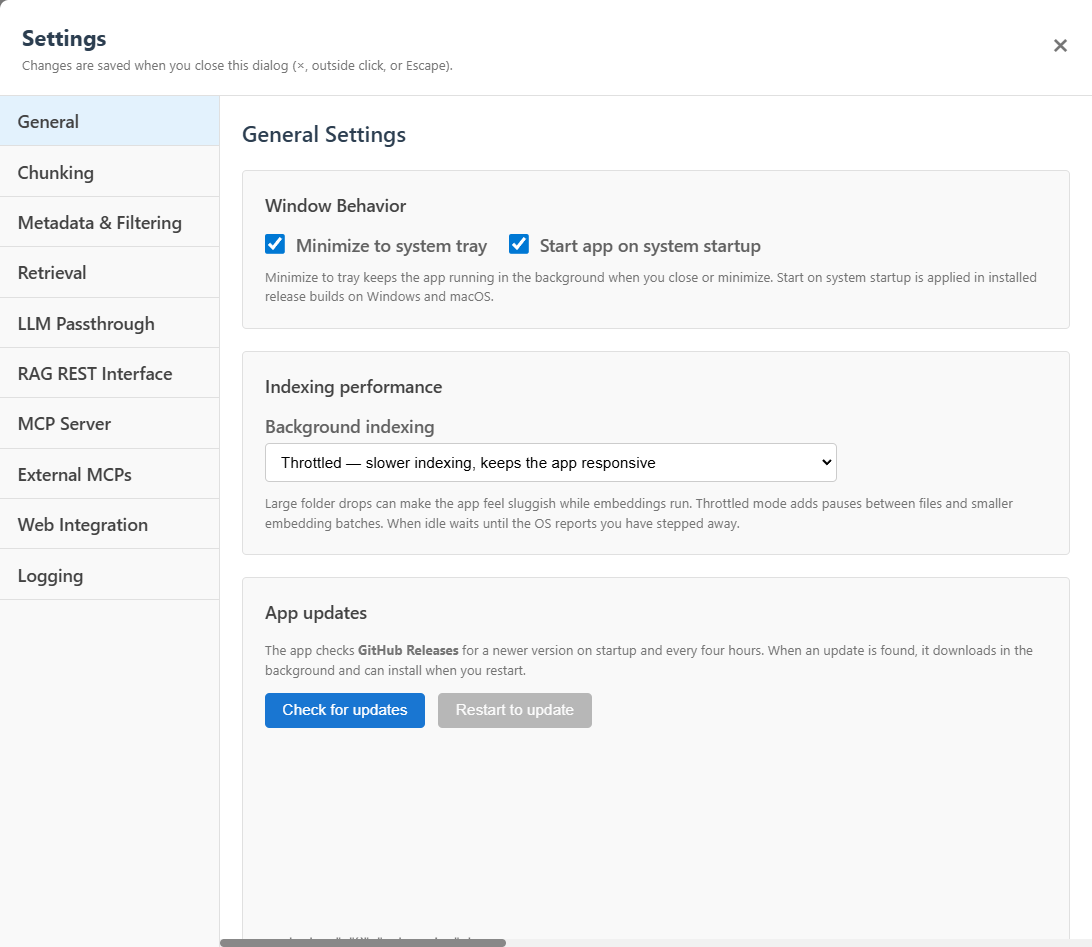
General settings
A real installed desktop app with tray behavior, startup options, background indexing controls, and update checks.
Why it matters: Froggy runs like normal local software — not a fragile script you babysit.
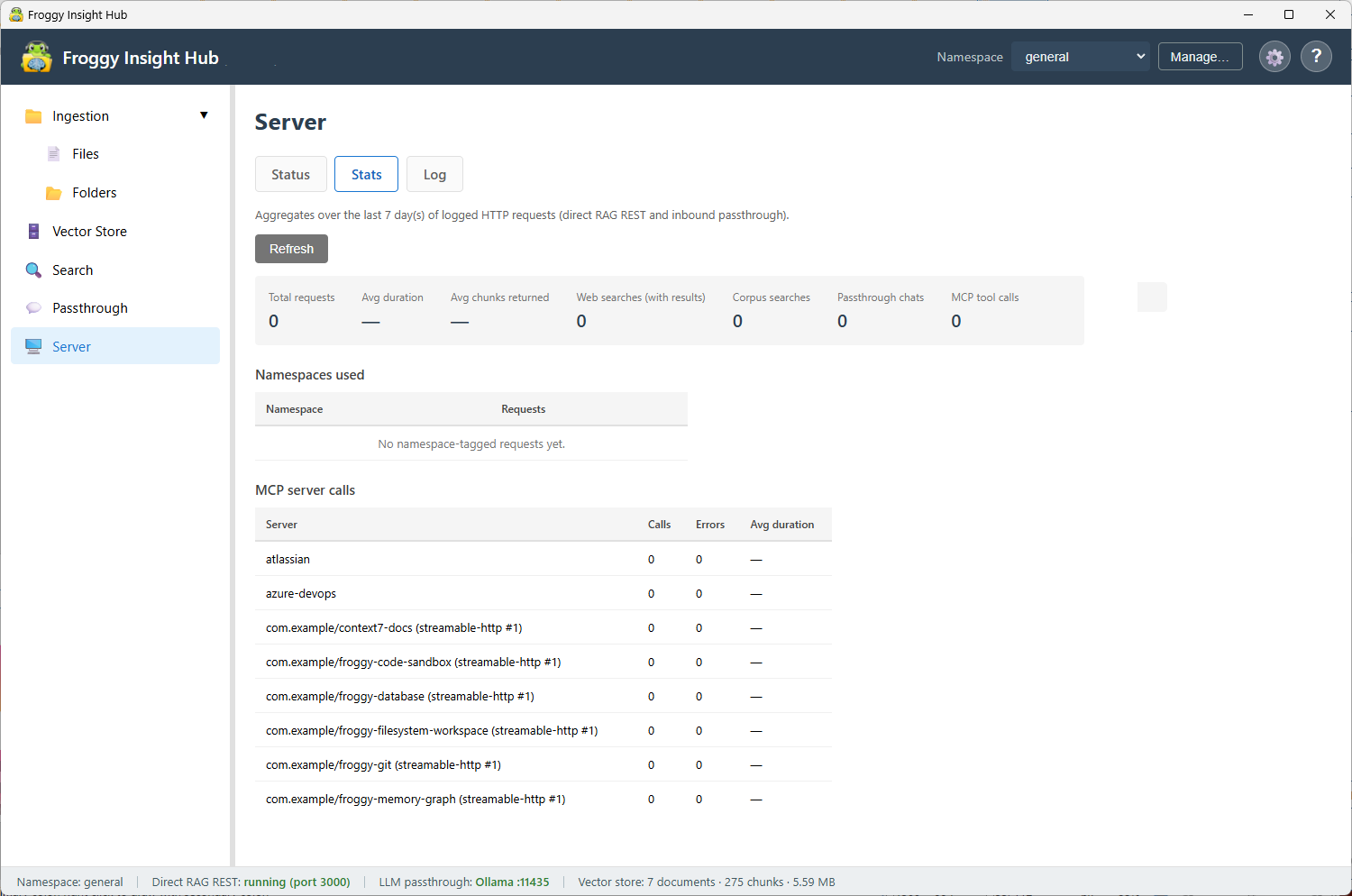
Server stats
Observe requests, latency, chunks returned, web searches, corpus searches, passthrough chats, MCP calls, and namespace usage.
Why it matters: Debug the local context layer with numbers — not guesswork.
Most RAG setups push complexity into every app. Froggy centralizes it.
Typical RAG
- Add retrieval code to each application
- Maintain custom prompt-injection logic
- Duplicate logic across OpenAI and Ollama clients
- Build separate integrations for IDEs and MCP clients
- Debug chunking, namespaces, and retrieval behavior in multiple places
- Glue together frameworks, vector stores, prompts, and tools
Froggy Context Hub
- One local AI gateway for knowledge, MCP, and context
- One retrieval/injection pipeline
- OpenAI-compatible and Ollama-compatible passthrough
- Namespaces for isolated corpora
- Prompt profiles for reusable behavior
- Metadata-aware retrieval for scoped context
- Inbound MCP rag_search for Cursor, Claude Desktop, and other MCP clients
- External MCP coordination from the same local control layer
- Server stats and local test tools for debugging
Intercept → Retrieve → Inject → Forward
Point your app at Froggy. Get context automatically. Your app → Froggy Context Hub → LLM, with context already injected.
-
Intercept the request
Froggy Context Hub accepts OpenAI-compatible or Ollama-compatible requests from existing tools and clients.
-
Search the active namespace
The local RAG engine retrieves ranked chunks from the selected corpus using the configured retrieval behavior.
-
Add the right context
Froggy injects structured context into the prompt so the model can answer from your knowledge bases.
-
Optionally coordinate tools
When configured, Froggy can blend web search or MCP tool results into the same flow.
-
Forward to your model
Froggy sends the enriched request to the upstream LLM you configured, local or remote.
-
Return the answer
Your app receives the response through the API shape it already expected.
See the setup guide for installation, namespace configuration, and passthrough listener setup.
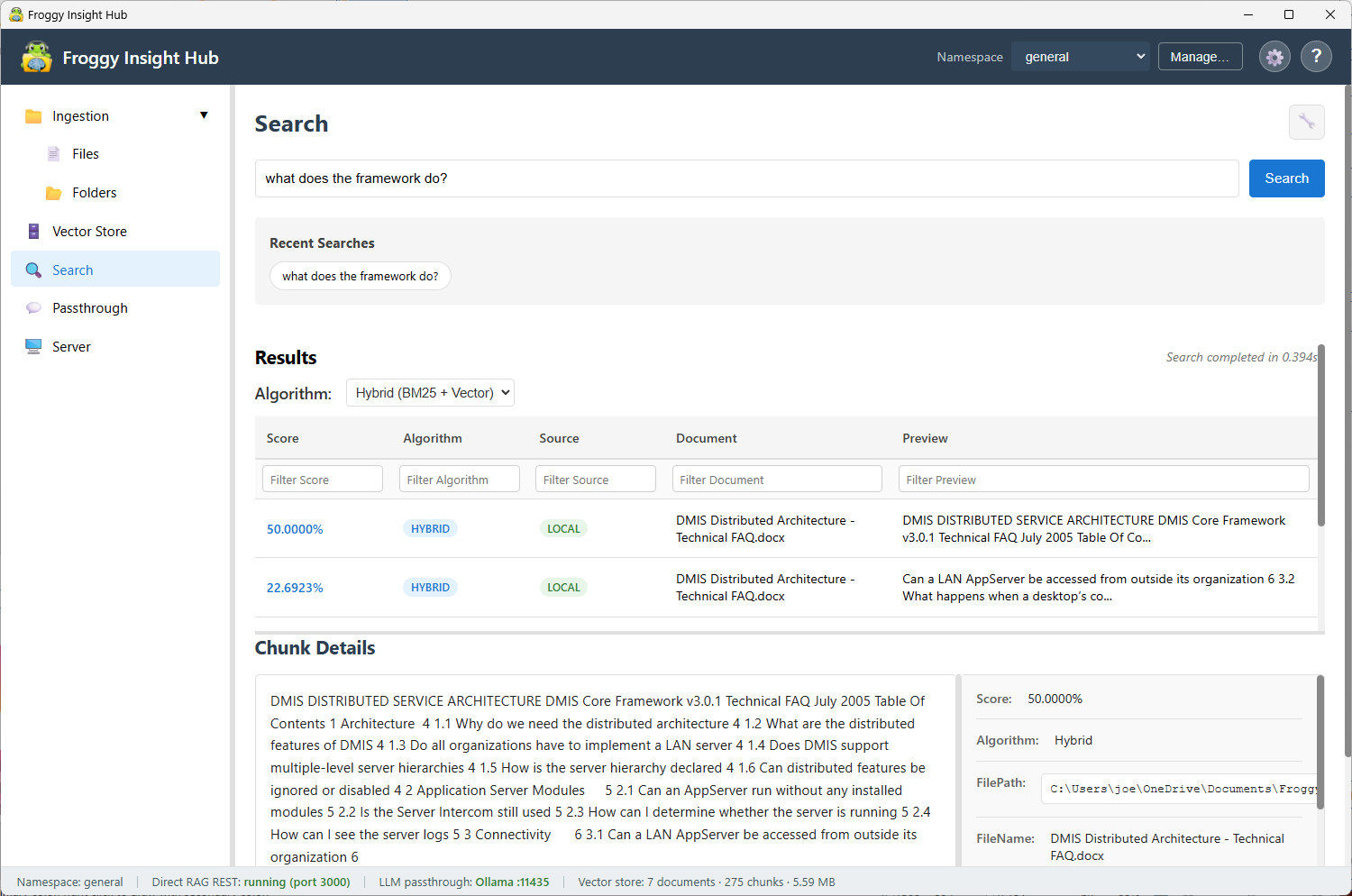
Search test
Validate retrieval quality inside the app before connecting external clients.
Why it matters: Tune chunking and retrieval with immediate feedback — not after wiring every client.
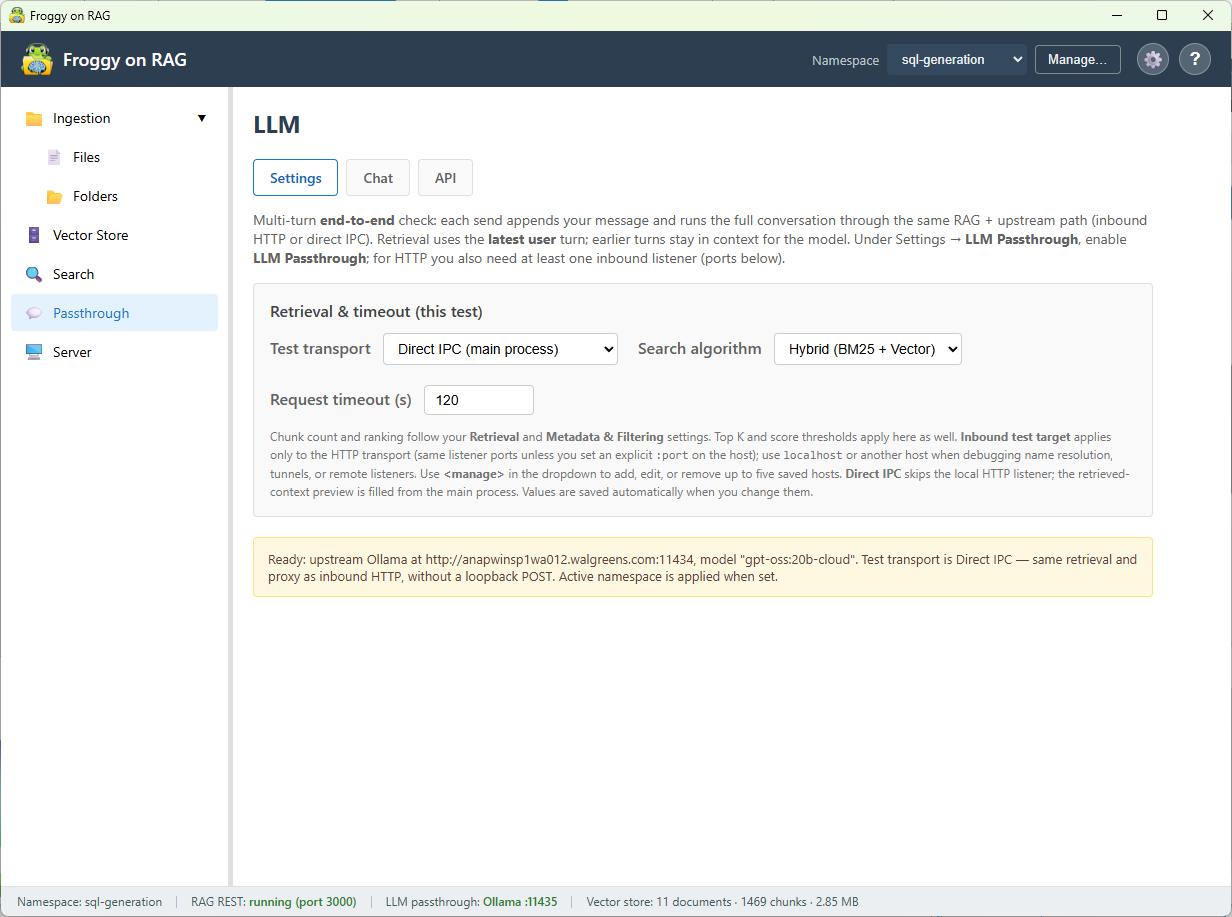
Passthrough test
Run an end-to-end RAG plus upstream LLM test on the same path inbound passthrough requests use.
Why it matters: What you test in the UI is what your OpenAI- and Ollama-compatible clients get.
Use your existing clients. Change the base URL.
Froggy Context Hub speaks the API shapes developers already use. OpenAI-style clients can call the OpenAI-compatible listener. Ollama-style tools can call the Ollama-compatible listener. MCP clients can call rag_search. The context pipeline stays consistent across all of them.
Instead of sending requests directly to your model, point the base URL at Froggy. Your client keeps its familiar request shape; Froggy adds the missing context layer.
- Existing OpenAI SDK-style apps
- Local Ollama workflows
- Scripts and internal tools
- Cursor and Claude Desktop through MCP
- Developer tools that need rag_search
- Apps that should gain context and RAG without embedding retrieval logic directly
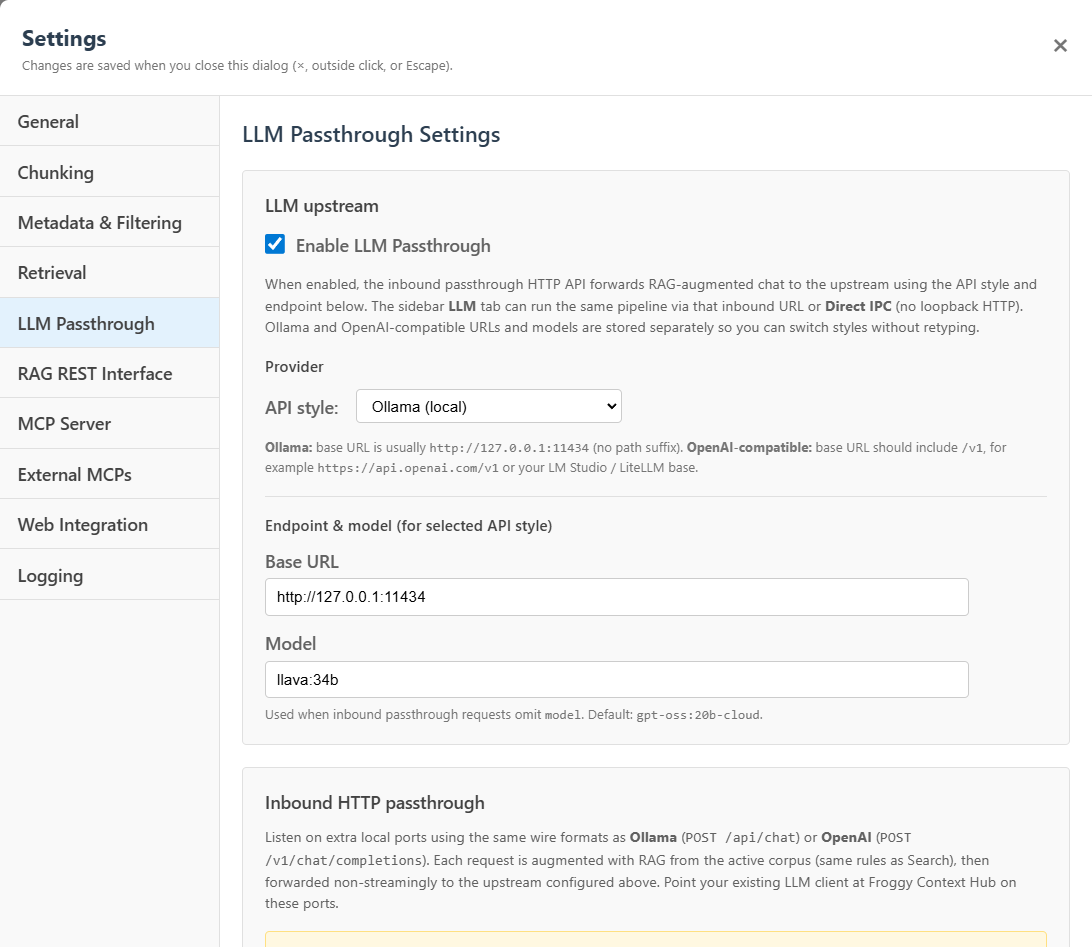
LLM passthrough settings
Configure Froggy to sit between OpenAI-compatible or Ollama-compatible clients and your upstream model.
Why it matters: Change the base URL in your client; Froggy owns the context injection layer.
Local-first by design.
Froggy Context Hub runs as a local desktop app with its own UI, API surfaces, vector store, ingestion controls, passthrough listeners, MCP configuration, and server stats. Your documents are indexed locally unless you explicitly configure remote model providers, web search, or external tools.
- Local desktop bundle with Windows installer and auto-updates
- Local vector store and namespaces
- Configurable ports and upstream model providers
- Local API tests, server status, and stats
- No separate server farm required for personal or small-team use
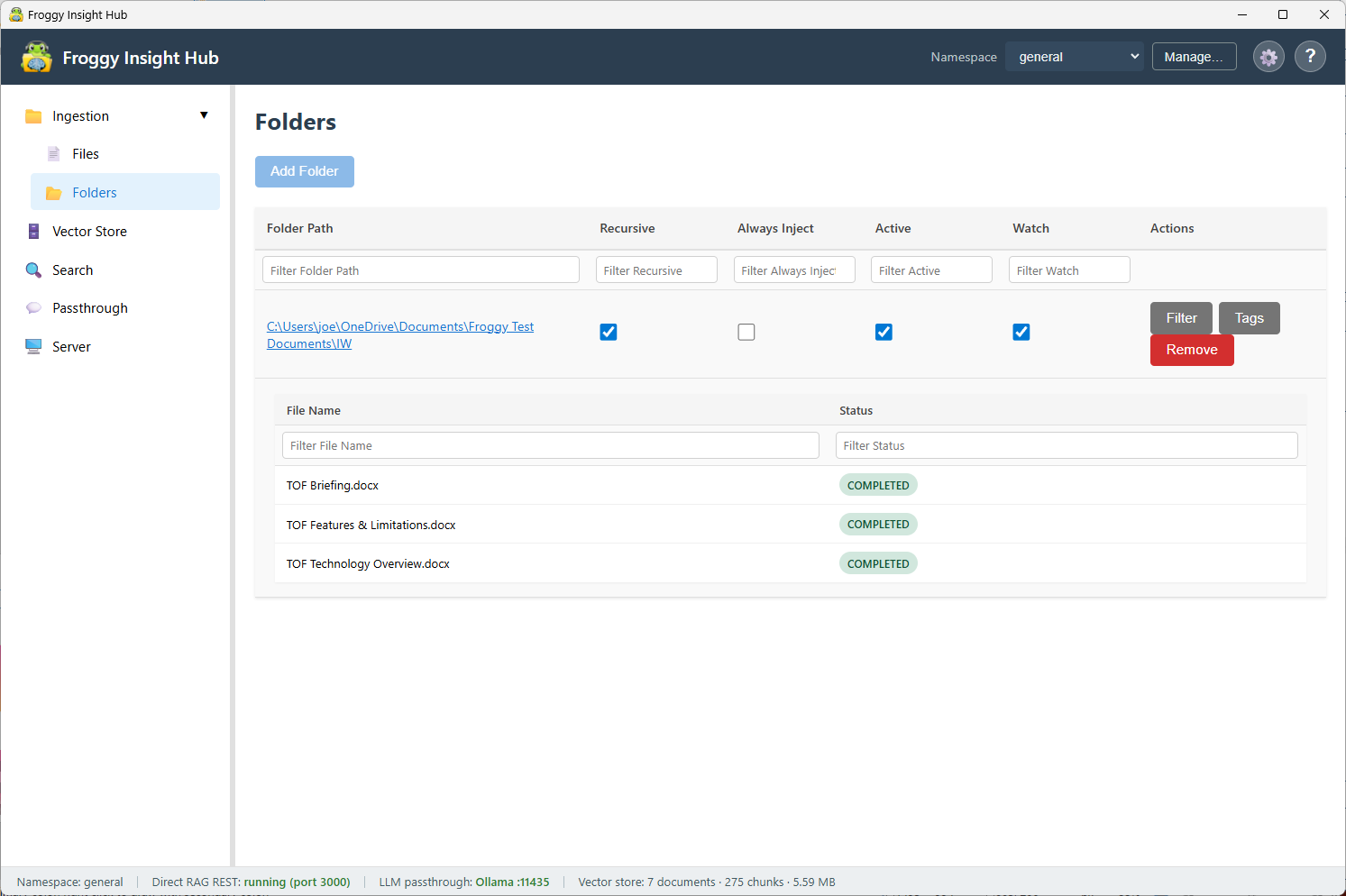
Folder ingestion
Point Froggy at local folders and source trees — no custom ingestion scripts required.
Why it matters: Real corpora land in the hub through a visible UI, not hidden pipeline code.
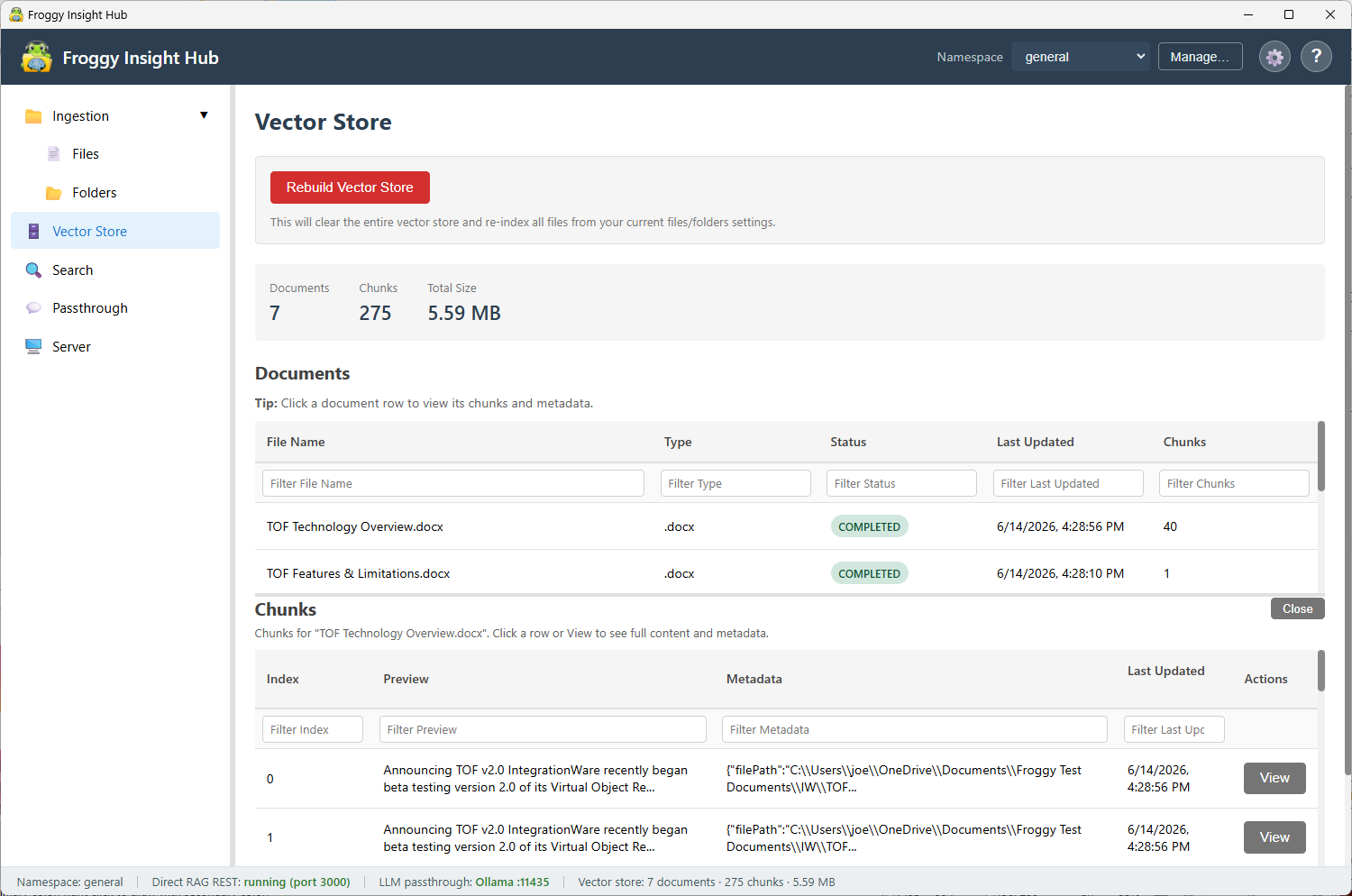
Vector store
See indexed documents, chunk counts, metadata, and search readiness instead of a black-box index.
Why it matters: You can inspect what is actually in the corpus before trusting retrieval.
See the local context hub in action
Every screen below supports a specific claim: visible ingestion, inspectable indexes, built-in test tools, passthrough configuration, MCP exposure, retrieval tuning, optional web search, and local observability — not decorative UI chrome.
General settings
A real installed desktop app with tray behavior, startup options, background indexing controls, and update checks.
Why it matters: Froggy runs like normal local software — not a fragile script you babysit.
Folder ingestion
Point Froggy at local folders and source trees — no custom ingestion scripts required.
Why it matters: Real corpora land in the hub through a visible UI, not hidden pipeline code.
Vector store
See indexed documents, chunk counts, metadata, and search readiness instead of a black-box index.
Why it matters: You can inspect what is actually in the corpus before trusting retrieval.
Search test
Validate retrieval quality inside the app before connecting external clients.
Why it matters: Tune chunking and retrieval with immediate feedback — not after wiring every client.
Passthrough test
Run an end-to-end RAG plus upstream LLM test on the same path inbound passthrough requests use.
Why it matters: What you test in the UI is what your OpenAI- and Ollama-compatible clients get.
LLM passthrough settings
Configure Froggy to sit between OpenAI-compatible or Ollama-compatible clients and your upstream model.
Why it matters: Change the base URL in your client; Froggy owns the context injection layer.
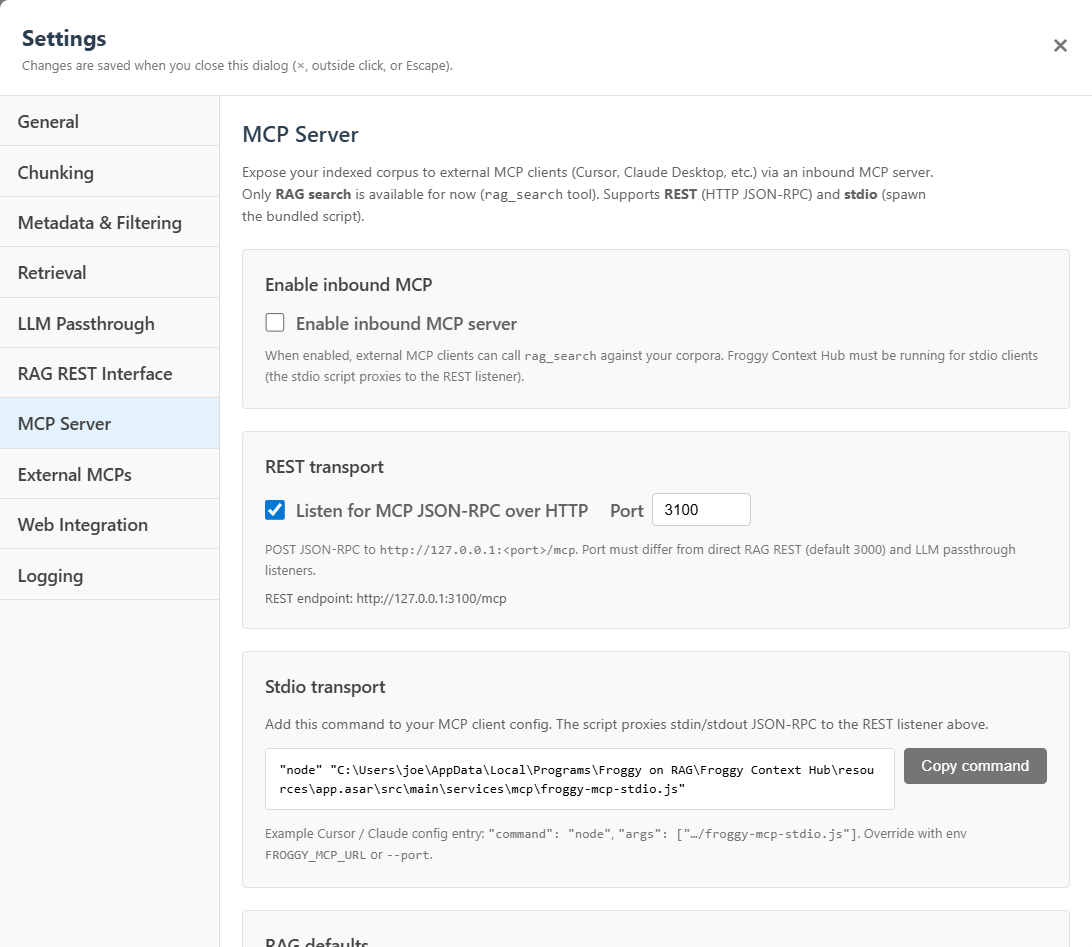
Inbound MCP server
Expose local corpora to MCP clients such as Cursor and Claude Desktop through rag_search.
Why it matters: IDE and agent workflows get local knowledge without per-tool custom integrations.
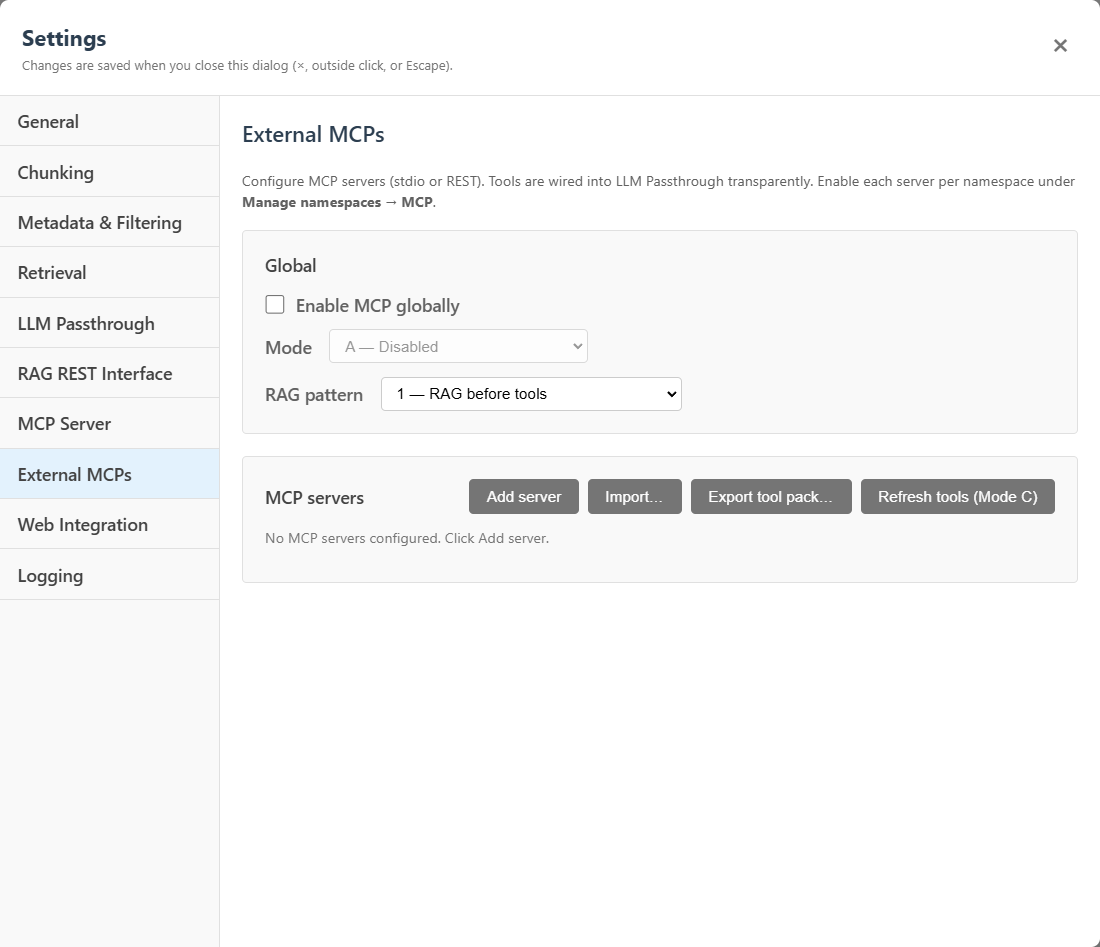
External MCP coordination
Register third-party MCP servers and manage how tools enter passthrough chat from one control layer.
Why it matters: Tool wiring becomes a namespace property, not a separate project per client.
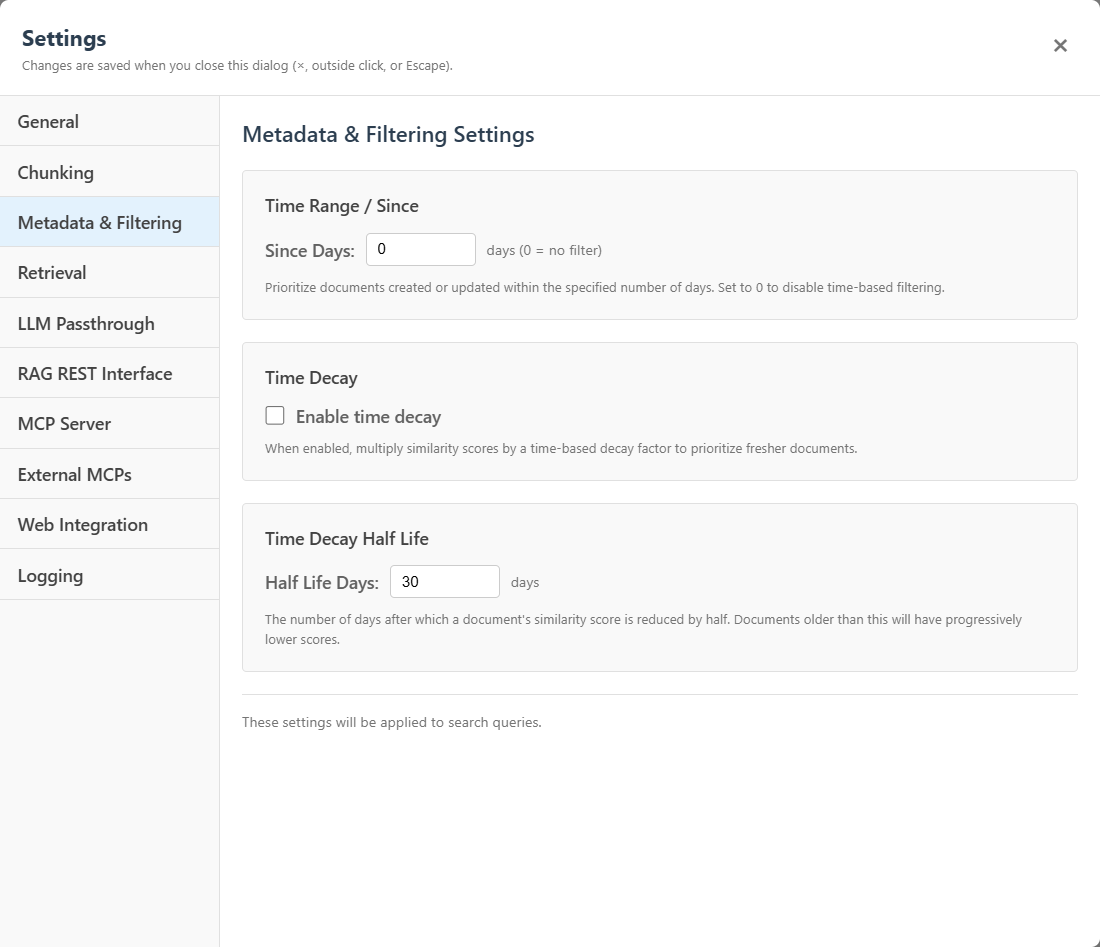
Metadata and filtering
Scope retrieval with tags, metadata, and time-aware filters — not basic vector search only.
Why it matters: Better scoping means fewer cross-domain answers and more relevant injected context.
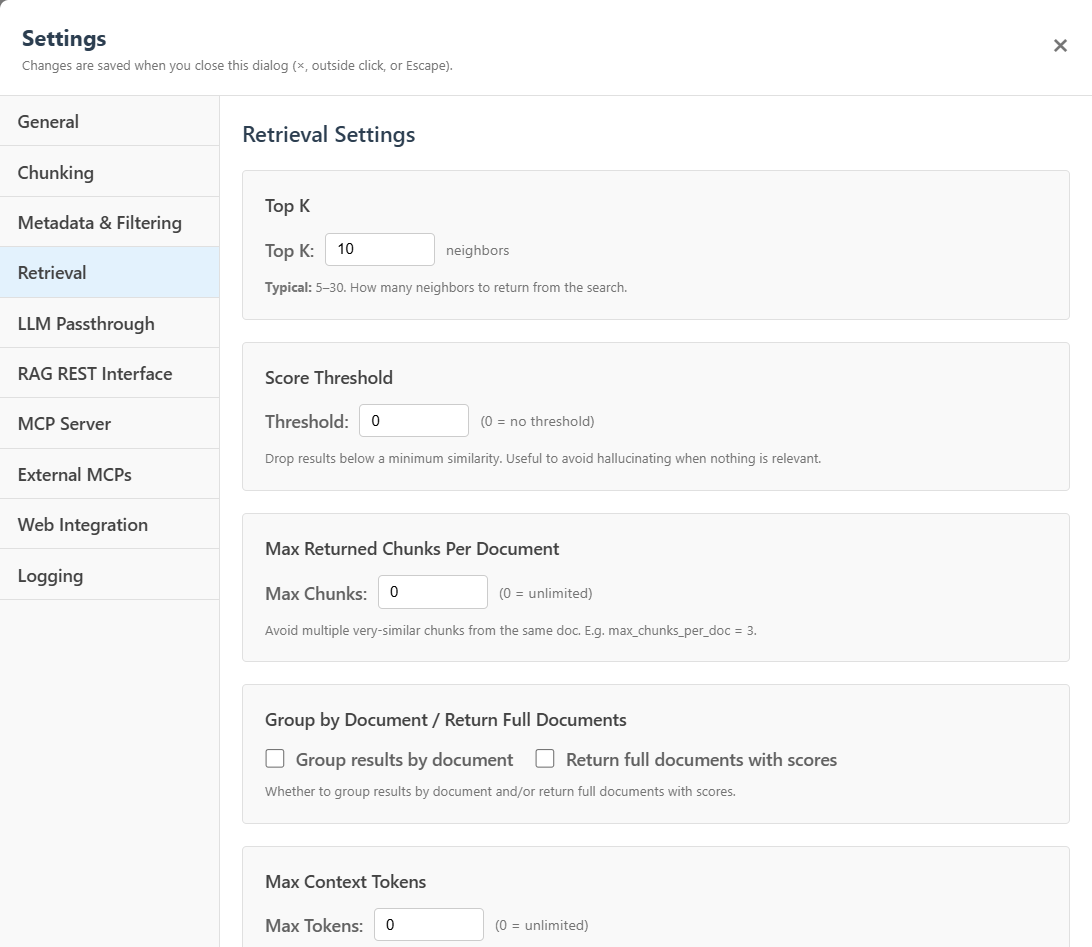
Retrieval tuning
Adjust top-K, score thresholds, max chunks per document, context token budgets, and related retrieval behavior.
Why it matters: Serious RAG control without editing code or redeploying client apps.
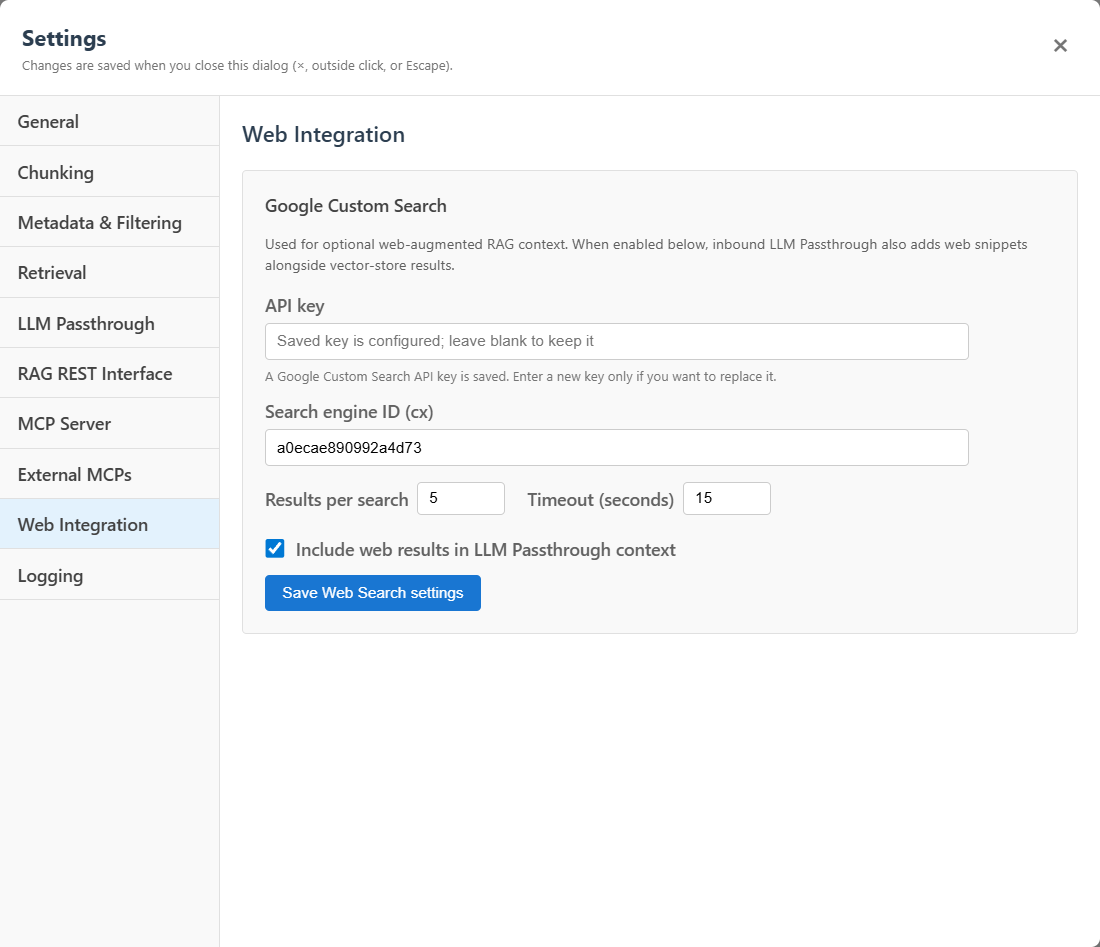
Web search blending
Optionally blend fresh web results into passthrough context when configured.
Why it matters: Grounded local knowledge plus timely external facts in one pipeline.
Server stats
Observe requests, latency, chunks returned, web searches, corpus searches, passthrough chats, MCP calls, and namespace usage.
Why it matters: Debug the local context layer with numbers — not guesswork.
One local control plane for context, RAG, passthrough, and MCP
Local AI gateway
One local place to manage private knowledge, namespaces, prompt profiles, MCP tools, passthrough behavior, and tool policy — not just a chat UI bolted onto a vector store.
OpenAI and Ollama passthrough
Expose both OpenAI-compatible and Ollama-compatible routes so you can keep using the clients, SDKs, and tools you already have. The context and RAG pipeline is shared across both.
Namespaces for isolated knowledge
Keep corpora separate by project, team, client, domain, or sensitivity level. Switch namespaces to change what grounds the model without redeploying client apps.
Prompt profiles for reusable behavior
Define reusable behavior templates for workflows like SQL generation, code assistance, documentation lookup, or general RAG. Standardize how retrieved context is framed without scattering system prompts everywhere.
Metadata-aware retrieval
Filter retrieval by metadata, tags, environment, project, sensitivity, platform, or any other structure you attach to chunks. Better scoping means more relevant context and fewer accidental cross-domain answers.
Inbound MCP rag_search
Expose your indexed corpora to MCP clients such as Cursor and Claude Desktop. IDE and agent workflows can search your local knowledge without each one needing a custom integration.
External MCP coordination
Configure third-party MCP servers once and let Froggy manage how tools are exposed to passthrough chat. Tools become a managed property of the namespace, not a per-client integration project.
Tool policy and approval controls
Shape tool usage with policies for risk level, approvals, namespaces, model access, max calls, and secret redaction. Keep risky operations gated while still giving models useful tool access.
Local diagnostics and stats
See which endpoints are active, which namespaces are being used, how many chunks are returned, where latency is coming from, and whether MCP calls or web searches are happening. Debug the local context layer without guessing.
Local-first desktop deployment
Runs as a Windows desktop app with auto-updates, local vector store, configurable ports and upstreams, built-in search and passthrough tests, and server stats — serious infrastructure you can operate from one UI.
Built for people who are past the RAG demo stage.
Developers
Add grounded context to existing scripts, apps, and SDK-based workflows without building retrieval into each one.
Solution architects
Centralize context routing, namespaces, passthrough configuration, RAG behavior, and tool policy in one local control layer.
Consultants
Create separate knowledge islands for clients, projects, codebases, and research without spinning up a full cloud platform.
Power users
Run a private local knowledge system that can grow beyond a single chat box.
Small teams
Use one local gateway pattern for documents, internal tools, MCP search, and controlled tool access.
Editions that match increasing architectural power
Pricing reflects what you need from the local context layer — not just how many files you upload. Try free, then upgrade for multiple corpora, API passthrough, MCP, metadata, and team governance.
Froggy Context Hub Free
$0
Free forever for evaluation
Try the local context hub with one private knowledge base.
Includes
- Local desktop app
- One namespace / one knowledge base
- One root folder for ingestion (subfolders allowed)
- Basic file/folder ingestion
- Basic local RAG search and chat
- Default chunking and retrieval
- Community / self-serve support
Limitations
- No commercial use
- No multiple namespaces or root folders
- No advanced prompt profiles or metadata filtering
- No inbound or external MCP
- No tool policy or governance
- No priority or team support
Froggy Context Hub Personal
$149
One-time purchase
Private local context and RAG for individuals with multiple knowledge bases.
Includes
- Everything in Free
- Multiple namespaces / knowledge bases
- Multiple folders and files
- OpenAI-compatible passthrough
- Ollama-compatible passthrough
- Basic prompt profiles
- Basic chunking and retrieval settings
- Search test UI and passthrough test UI
- Free 1.x updates included
Limitations
- No commercial use
- No team use
- No external MCP governance
- No priority support
Recommended
Froggy Context Hub Professional
Launch price $199
Regular $299
One-time purchase · Launch pricing shown
The developer edition: API passthrough, advanced retrieval, metadata filtering, Direct RAG REST, inbound MCP, and commercial solo use.
Includes
- Everything in Personal
- Commercial solo use
- Advanced prompt profiles
- Tags and metadata filtering
- Advanced retrieval and chunking controls
- Direct RAG REST API
- Inbound MCP server with rag_search
- Optional web search blending
- Server stats and advanced passthrough configuration
- Discounted major upgrades
Limitations
- External MCP governance and team licensing require Business
Froggy Context Hub Business
$999
One-time purchase
The small-team edition: external MCP coordination, tool policy, deployment docs, team-friendly licensing, and priority support.
Includes
- Everything in Professional
- Team-friendly licensing
- Deployment documentation
- Priority email support for 12 months
- External MCP client and server configuration
- RAG/tool coordination modes
- Per-server MCP policy and tool approval rules
- Secret redaction and tool-pack import/export
- Per-MCP-server call and error stats
- Commercial internal business use
- Discounted major upgrades
Limitations
- Enterprise connectors and centralized admin are planned separately
Coming Later
Froggy Context Hub Enterprise
$0
Coming later
Coming later: governed connectors, scheduled sync, SSO, RBAC, audit logs, and enterprise deployment.
Includes
- Everything in Business — planned
- SharePoint connector — Coming later
- Google Drive / Docs connector — Coming later
- Confluence and Jira connectors — Coming later
- GitHub/GitLab and Slack/Teams ingestion — Coming later
- Scheduled sync and centralized admin — Coming later
- RBAC, SSO/SAML/OIDC, and audit logs — Coming later
- Custom connector development — Contact
- Deployment assistance and custom SLA — Contact
Limitations
- Not part of the initial launch checkout
Coming later for teams and enterprises
These capabilities are planned for future Team and Enterprise editions. They are not part of the current launch.
Froggy Context Hub is a local AI gateway for private knowledge, MCP tools, prompt profiles, and grounded context. The first launch focuses on local-first desktop deployment, passthrough APIs, namespaces, and small-business governance. Future Team and Enterprise editions may add managed managed connectors, scheduled sync, centralized administration, SSO, audit logs, and deeper governance.
- SharePoint connector Planned
- Google Drive / Google Docs connector Planned
- Confluence connector Planned
- Jira connector Planned
- GitHub / GitLab connector Planned
- Slack / Teams export ingestion Planned
- Scheduled sync Planned
- Centralized admin Planned
- Shared team namespaces Planned
- RBAC Planned
- SSO / SAML / OIDC Planned
- Audit logs Planned
- Custom connector development Contact
Honest limitations
- Retrieval quality depends on your documents, chunking, and prompts — validation is still required
- Not every edge case in RAG is handled automatically
- Performance varies with corpus size, hardware, and chosen models
- Some advanced customization may require deeper configuration
Froggy Context Hub does not claim to eliminate testing and tuning on your data. It gives you one local context hub to manage that work instead of repeating it in every client.
Frequently asked questions
Is Froggy Context Hub still a RAG product?
Yes — RAG is how Froggy grounds answers in your private knowledge. But the product is positioned as a local AI gateway: one place for private knowledge, MCP tools, prompt profiles, and grounded context across your apps, without rebuilding RAG in every client.
Is Froggy Context Hub a subscription?
No. Free is free for evaluation. Paid editions are one-time purchases for the current major version. Future major upgrades may be paid, with discounts for existing paid customers.
What are the limits of the Free edition?
Froggy Context Hub Free lets you try the local context hub with one knowledge base from one root folder, including subfolders. It is intended for personal evaluation and non-commercial use.
Can I use the Free edition for my business?
No. Commercial use requires Froggy Context Hub Professional or Business.
Do I need OpenAI?
Not necessarily. Froggy Context Hub is designed to work with OpenAI-compatible and Ollama-compatible workflows, depending on how you configure upstream models.
Can it run with local models?
Yes. Froggy Context Hub is local-first and supports Ollama-compatible workflows when configured.
Is my data uploaded to FroggySoft?
Froggy Context Hub is a local-first desktop app. Your documents are indexed locally unless you explicitly configure remote model providers, web search, or external tools — those may send relevant request data to third parties.
What is a namespace?
A namespace is an isolated knowledge base or corpus. It lets you keep different projects or document sets separate.
What is the difference between Personal and Pro?
Personal is for private individual use. Pro adds commercial solo use, developer and API capabilities, advanced configuration, metadata filtering, Direct RAG REST, inbound MCP, web search, and stats.
What is the difference between Pro and Business?
Business adds small-team licensing, priority support, deployment documentation, external MCP and tool governance, approval policies, secret redaction, and team-friendly controls.
What happens when version 2.0 comes out?
You keep the version you bought. Major upgrades may be optional paid upgrades, with discounted pricing for existing paid customers.
Do you offer setup help?
Setup and onboarding may be offered separately, especially for Business and future Enterprise customers.
Will you support SharePoint, Google Docs, and Confluence?
These are planned future Team and Enterprise capabilities. They are coming later and are not included in the initial paid checkout tiers.
Stop rebuilding RAG in every app.
Froggy Context Hub is a local AI gateway that gives your apps access to private knowledge, MCP tools, prompt profiles, and grounded context — without rebuilding RAG for every client.